
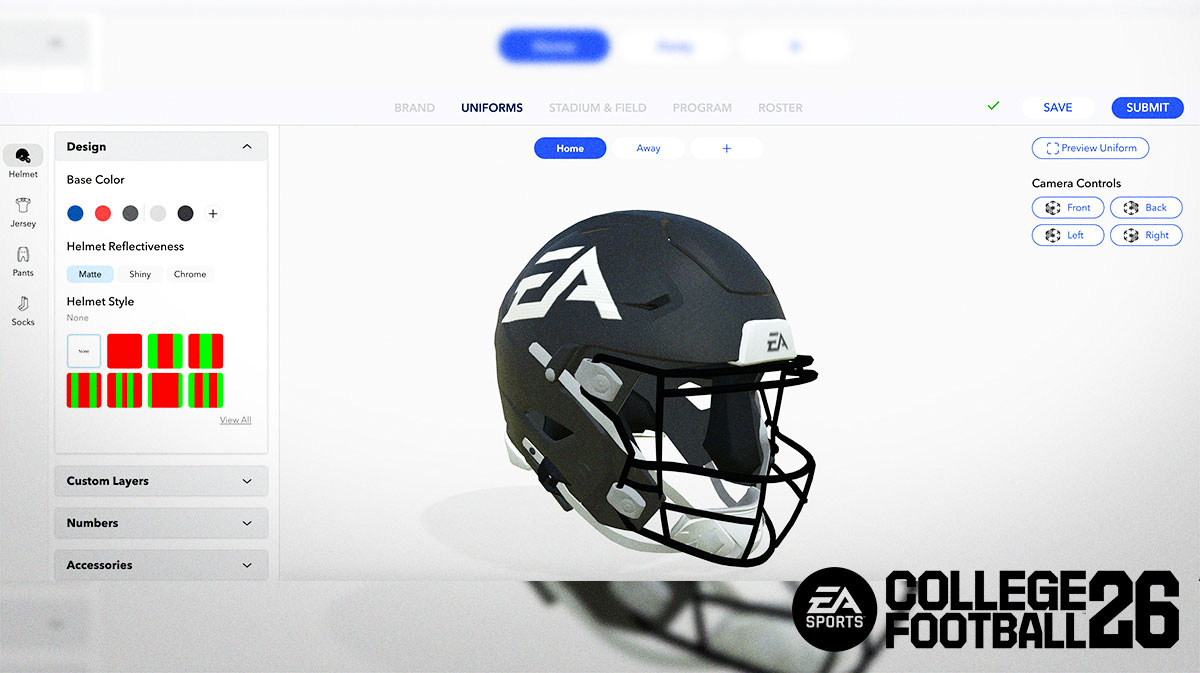

College Football 26 features 136 schools to play with in Dynasty, but you can still create a team with team builder and import it into the game. In this Team Builder guide, we’ll show you how to make your own College Football 26 school. Then, we’ll show you how to import that team into the game for use in Dynasty, Road To Glory, and Play Now. Without further ado, let’s dive into Team Builder.
College Football 26 Team Builder Guide For Beginners
In order to use the College Football 26 Team Builder, you must do a couple of things beforehand:
- Create an EA account
- Link your EA account to your PlayStation Network or Xbox account
Once finished, head over to the College Football 26 Team Builder website.
How to create your own Team in College Football 26
With College Football 26 Team Builder, you can create and edit almost every aspect of your team. The five main categories of customization include:
- Brand – School Info, Logos, Color, Apparel Brand, and Fonts
- Uniforms – Home, Away, and Alternate Uniforms
- Stadium & Field – Stadium Base, Crowd, Surface, Logos, end zones, numbers, sidelines, benches
- Program – Playbooks, Program Type, Rivalries, Recruiting Pipelines, My School Grades
- Roster – Presets, Player Abilities, Player Ratings, & more
Firstly, before you begin anything, keep in mind that you can save your progress as you build your team. Therefore, SAVE OFTEN so you do not lose your progress!
Brand
In the Brand phase, you edit your school’s information such as their team name, hometown, and more. You can use pre-made logos from EA Sports, or upload your own custom logos.
However, keep in mind that custom logos may not contain offensive language or copyright material. Furthermore, it also must not contain personal information of any kind. Fortunately, College Football 26 allows you to create your own logos or even use AI to create a new one.
When using your own logo, make sure to remove the image background and make your logo transparent. There are a number of websites and applications that do this for free.
Uniform
The uniform section lets you customize helmets, jerseys, pants, and socks. Depending on who you choose for your apparel brand, you’ll see their logo on different pieces of your Uniform. Take your time with this page, as there’s a lot of customizable options provided for you.
Stadium & Field
In the Stadium section, you can use various real or custom stadiums as a base. Customize it however you like, and make adjustments according to your specifications.
Program
The Program Page is where we really start to fill the serious details of your team. The first thing you’ll see on the top left side is your Strategy, where you pick both your offensive and defensive playbooks.
Under that section, you’ll pick your My School Program Type. Note that when you change your program type, your My School Grades change as well as your school’s Team Prestige. Take a look at each Program Type and find one that works for what you want.
Want a dominant school? Pick a Powerhouse program. Want a bad school with no reputation? Choose Fail U.
Beneath that section comes Rivalries. This year, players can now add up to 5 rivals for their schools, and edit things like:
- Rivalry history
- head-to-head record
- Current Winning Streak
Lastly, you can edit your program’s Recruiting Pipelines. You can also edit the tier of your recruiting pipeline, helping you secure who you want. Is there a five-star recruit in Alabama you really want? Customize your Alabama pipeline tier and get to recruiting!
Roster
Finally, we come to Roster. This will likely take the longest out of all sections, especially if you want to customize all players. Overall, this page allows you to edit almost everything about a player. From their bio, appearance, weight, height, ratings, abilities, Archetype, grade, and much more, you can customize the entire roster to your liking.
How to download your created school in College Football 26
When you finish creating your school in Team Builder, click submit on the website to add your team to the game.
To download your created school in College Football 26, switch to the Create & Share tab and go down to the Download Center menu. From here, there are a few different ways to search for your school. However, we find that the easiest method includes pressing Y/Triangle to search for your EA Account username.
This takes you to a page full of your created teams. Before importing your team, the game gives you a chance to preview all the final details. If anything doesn’t look right, go back to Team Builder to re-edit if necessary.
How to Import your Team Builder School to College Football 26 Dynasty
To import your Team Builder school to Dynasty in College Football 26, you must create an Cloud Multi User league. After selecting which roster you want to use, you’ll see the option to Import your Team Builder school. You will then need to pick a school to replace in order for your team to join.
To import your Custom Team to to Road to Glory, select the Import High School Team Builder option in the settings when creating your character. Lastly, for Play Now, just hold R2/RT on the main menu and select “Team Builder” teams to see the schools you’ve created.
Overall, that wraps up our College Football 26 Team Builder Guide & How to Import your team into the game.
Lastly, for more gaming and NCAAF news, visit ClutchPoints. Furthermore, subscribe to our gaming newsletter for more weekly info.
